Table of Contents
- Key Takeaways
- 1. How to Track Escape Room Stats: Start With the Core Five
- 2. How to Track Escape Room Stats With Morty (The Easiest Method)
- 3. Import Your Existing Game History Fast (No Manual Entry)
- 4. How to Track Escape Room Stats in a Live Google Sheet
- 5. Rate Every Room With Actual Nuance
- 6. Compare Your Stats to Your Crew
- 7. Build a Wishlist Alongside Your Stats
- Conclusion
- Frequently Asked Questions
- What is the best app to track escape room stats as a player?
- How do I import all my past escape room games into Morty at once?
- Can I export my escape room stats to Google Sheets?
- What escape room stats should I be tracking as a player in 2026?
- How do I track escape room stats across different cities and venues?
- Is tracking escape room stats worth it for casual players?
.png?table=block&id=37f0825e-e1f4-805e-999d-f2fb187395e8&cache=v2)
Do not index
If you're serious about how to track escape room stats, you already know the feeling: you walk out of a room buzzing, and two weeks later you can't remember if you escaped with 4 minutes left or used three hints. Then a year later, you can't even remember the name of the game you played and accidentally replay it. Your escape room history deserves better than a foggy memory.
Key Takeaways
- What stats should I track as an escape room player? Completion (escape or fail), time remaining, hints used, difficulty rating, and your personal score are the core five.
- Why bother tracking escape room stats? It helps you remember what you've done and what you loved the best, avoid repeating the same game, and make recommendations for other players in the community.
- What's the easiest app to track escape room stats? Morty is built exactly for this — log every room, rate it, and build a full immersive history.
- Can I import my past games all at once? Yes! Morty users can import games in bulk via BlitzMatch so you don't have to enter every room manually.
- Can I export my escape room stats to a spreadsheet? Absolutely — Morty lets you keep a live Google Sheet synced with all your logged experiences.
1. How to Track Escape Room Stats: Start With the Core Five
Every serious immersive junkie needs a baseline. Before you build any system, know exactly what you're capturing.
These five stats cover everything that matters:
- Escape or Fail — Did you get out? Yes/no. Simple, but foundational.
- Time Remaining — Not just "escaped," but how comfortably. 1 minute left vs. 15 minutes left tells a very different story.
- Date Played — Otherwise your experience diary will be confusing.
- Difficulty Rating — Your subjective read. Was the advertised "hard" actually hard for your crew?
- Overall Enjoyment — Because escaping a mediocre room feels less sweet than failing a mind-blowing one.
Track all five consistently and you'll start seeing real patterns after just ten or fifteen rooms.
2. How to Track Escape Room Stats With Morty (The Easiest Method)
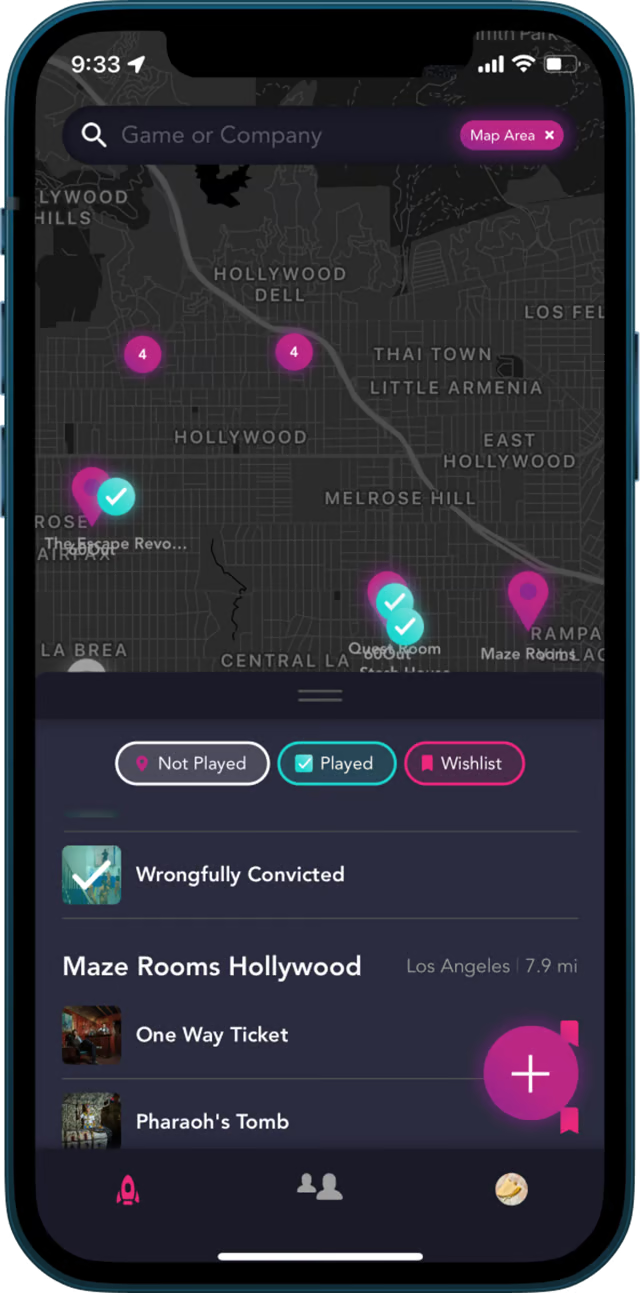
The world is increasingly aglow in awesome immersive attractions. Morty exists to unify the “underground theme park” of fun stuff around the world, so you can get it all in one place — including your personal stats.
When you log a room in Morty, you capture your escape result, score, and rating in a few taps. It builds your living record automatically as you play your way through experiences around the world.


Morty's rating system goes deeper than a star score. You get a detailed breakdown so your escape room stats actually reflect the nuance of each adventure.
3. Import Your Existing Game History Fast (No Manual Entry)
Already have a pile of rooms under your belt and don't want to log them one by one? Smart. Morty users can import their games in bulk using BlitzMatch, which pulls your existing play history in automatically.
This is a game-changer for veteran players who've been adventuring for years. Your stats don't have to start from zero — bring everything over and hit the ground running.
4. How to Track Escape Room Stats in a Live Google Sheet
Some immersive junkies want their data somewhere they can slice, sort, and analyze it. Totally valid.
Morty lets you sync your experiences to a live Google Sheet that stays updated over time. Every new room you log in Morty flows right into your spreadsheet.
From there you can build your own dashboards, track completion rates by difficulty, or calculate your average hints-per-room. Every. Stat. Ever.
5. Rate Every Room With Actual Nuance
A flat 5-star score doesn't tell you anything useful when you're looking back at 80 rooms. You need dimension.


Break your ratings down by puzzle quality, set design, story, and fun factor separately. When you look back at your escape room stats six months later, you'll actually know why you loved or hated a room — not just that you gave it four stars.
6. Compare Your Stats to Your Crew
Tracking escape room stats solo is sweet. Comparing them to your squad is sweeter.
Morty shows you how your friends rated the same rooms — so you can see who loves which types of attractions. It turns your personal log into a shared adventure record.
7. Build a Wishlist Alongside Your Stats
The best players don't just track where they've been. They track where they're going next.
Morty lets you save rooms to a wishlist alongside your play history. Your stats inform your wishlist — if you're escaping most medium-difficulty rooms with hints to spare, it's time to level up.
Browse mind-blowing options in cities like Chicago, Toronto, or Paris and start filling your adventure queue.

Conclusion
Knowing how to track escape room stats properly is what separates casual players from genuine immersive junkies. Start with the core five metrics, get them into Morty, bulk-import your history with BlitzMatch, and pipe everything into a live Google Sheet if you want to go deep.
The immersive economy is a tapestry of small business pioneers building Disney Imagineering-caliber adventures in strip malls and warehouses everywhere. Your stats are the record of every one of those adventures. They deserve a real home. Come join our quest.
Frequently Asked Questions
What is the best app to track escape room stats as a player?
Morty is the most purpose-built app for tracking escape room stats as a player. It logs your completions, ratings, hints, and scores in one place, and you can export everything to a live Google Sheet.
How do I import all my past escape room games into Morty at once?
Morty supports bulk importing via BlitzMatch, which lets you pull in your existing play history without manual entry. Check out the full import guide here.
Can I export my escape room stats to Google Sheets?
Yes — Morty lets you sync your experiences to a live Google Sheet that updates automatically as you log new rooms. It's perfect for players who want to analyze their data further.
What escape room stats should I be tracking as a player in 2026?
The five most useful stats to track are: escape or fail result, time remaining at the end, date played, difficulty rating, and overall enjoyment score. Together they give you a complete picture of your performance and preferences over time.
How do I track escape room stats across different cities and venues?
An app like Morty covers escape rooms globally, so your stats stay in one unified log no matter where you play. Browse rooms in cities like Barcelona or Detroit and log them all in the same profile.
Is tracking escape room stats worth it for casual players?
Absolutely. Even casual players benefit from seeing their game log climb. It makes every future room choice more informed and every session more satisfying.
Written by